How to Optimize Shopify Collection Pages for SEO in 2026
Running a Shopify store is hard enough without struggling to get your products noticed. Google reports that people shop across its platforms more than 1 billion times a day, using a Shopping Graph with over 60 billion product listings. To help shoppers find what they need, your collection pages should clearly explain what you sell…
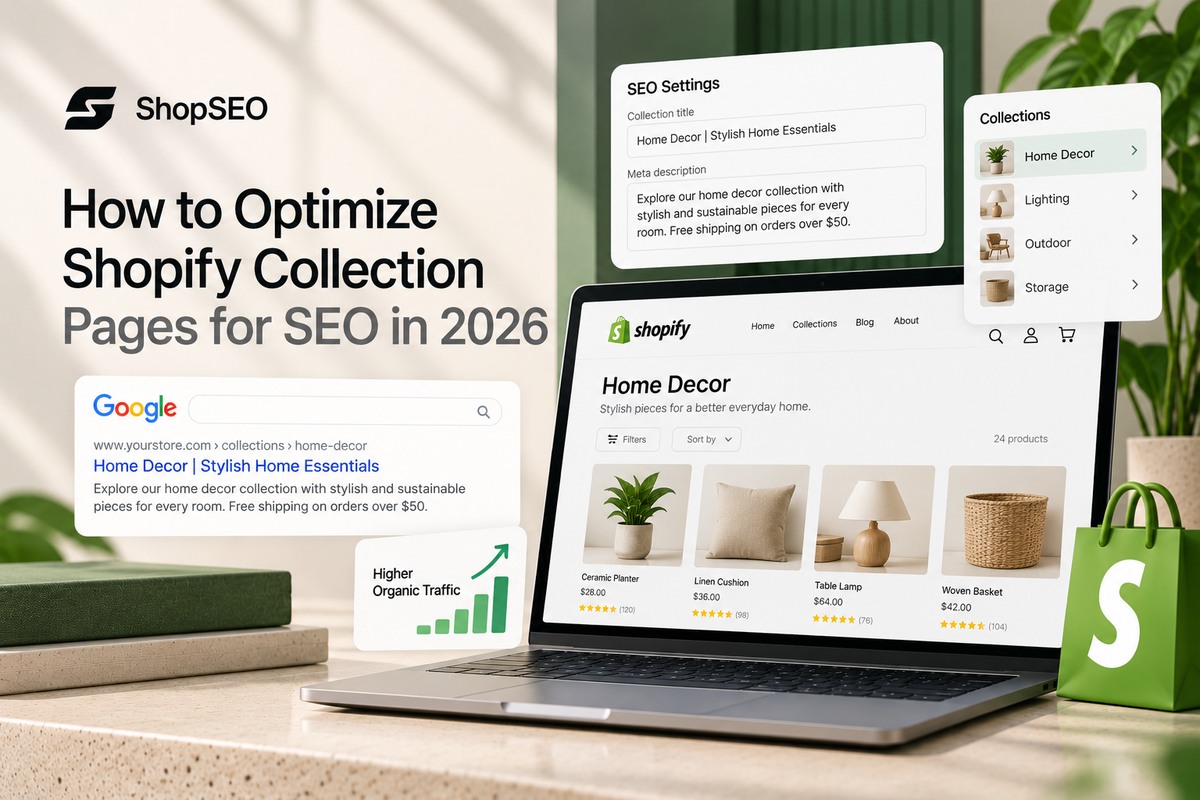
Table of contents
- Why Shopify Collection Pages SEO Optimization Drives Sales?
- Research Keywords For Profitable Store Category Structures
- Craft High-Click Meta Titles And Clean URL Handles Quickly
- Structure Collection Content Above And Below Product Grids
- Build Internal Links And Topic Clusters Across Collections
- Fix Technical Canonical Tags On Filtered Collection Pages
- Optimize Category Pages For AI Search And Answer Engines
- Automate Collection Audits With The ShopSEO Store Platform
- Start Growing Your Category Traffic And Store Revenue Today
- FAQs
Running a Shopify store is hard enough without struggling to get your products noticed. Google reports that people shop across its platforms more than 1 billion times a day, using a Shopping Graph with over 60 billion product listings.
To help shoppers find what they need, your collection pages should clearly explain what you sell and make related products easy to browse. Shopify collection pages SEO optimization starts with relevant keywords, useful category descriptions, clear titles, and links that help customers explore your store.
Why Shopify Collection Pages SEO Optimization Drives Sales?
Category pages act as the main front doors for shoppers who are ready to compare items and buy today. Focusing on shopify collection pages seo optimization helps your store capture broad searches with high commercial intent every day. Here are the core reasons why your category pages deserve your primary focus right now.
| Store Page Feature | Collection Pages | Product Pages |
| Search Intent | Compare products, styles, and prices. | Find details about a specific product. |
| Search Demand | Target broad category searches. | Target specific product searches. |
| Inventory Changes | Stay relevant as products change. | Update pages when products sell out. |
| Internal Links | Link shoppers to multiple products. | Link to related products and collections. |
- Higher Search Volume Across Broad Buyer Categories
Shoppers rarely type an exact product serial number into a search bar when they first start shopping online. According to the official Shopify Global Ecommerce Sales Growth Report for 2026, global ecommerce sales will reach 6.88 trillion dollars. Capturing your fair share of that massive spending starts with ranking for broad category phrases that buyers use daily.
- Better Protection Against Seasonal Stock Changes
Individual products go out of stock or get retired at the end of every single retail season without warning. When you build search authority on a collection page, your rankings stay safe while products rotate inside the grid. You never lose your hard-earned page one spot just because a single shirt color sold out last Tuesday night.
- Stronger Readiness For Modern AI Shopping Engines
Modern shoppers use conversational search assistants to compare brands and find the best category options in seconds today. Well-structured collection pages give answer engines the exact context they need to recommend your catalog over competing online stores. When your category pages include clear headings and clean data, both traditional crawlers and AI assistants trust your store.
Research Keywords For Profitable Store Category Structures
Picking the right search terms prevents your pages from competing against each other in the organic search results. Smart keyword research turns a messy product catalog into an organized store hierarchy that both humans and crawlers love. Follow these structured steps to map your collection keywords and build high-converting sub-collections across your entire store.
- Group your catalog into three clear keyword tiers before creating any new pages inside your store admin today:
- Broad Core Category Terms: Target wide product families like women’s dresses or leather boots on your main top-level navigation collection pages.
- Specific Sub-Category Modifiers: Create dedicated collections for style variations like linen midi dresses or waterproof hiking boots to capture focused buyers.
- Use-Case And Seasonality Phrases: Build targeted collections around buyer occasions like summer wedding guest dresses or winter trail running gear for easy wins.
- Verify real inventory depth before you publish a new collection page for a specific keyword phrase:
- Never build a dedicated category page if you only carry one or two products that match that search term.
- Shoppers bounce back to search results immediately when they land on a category page that looks nearly empty.
- Wait until you have at least six to eight relevant items before launching a specialized sub-collection page online.
- Assign one unique primary keyword to every single collection URL in a simple tracking sheet:
- Check that no two collection pages target the exact same search intent or primary keyword phrase on your site.
- Merge duplicate or overlapping collections together so all your ranking signals point toward one strong URL instead of splitting.
Spot Long-Tail Sub-Collection Ranking Opportunities
Broad keywords are often harder to rank for. Target specific searches based on product features, materials, or customer needs.
- Examples: “Women’s blouses” → “Washable silk blouses.”
- Create sub-collections only when you have enough relevant products to offer shoppers a useful choice.
Prevent Keyword Cannibalization Across Similar Pages
Avoid creating multiple collections that target the same search intent and contain nearly identical products.
- Example: “Men’s Gym Shirts” and “Men’s Workout Tops” may overlap.
- Give each collection a distinct purpose, or combine them if they serve the same shopping need.
Craft High-Click Meta Titles And Clean URL Handles Quickly
Your meta title and URL handle are the very first things a shopper sees on a crowded search page. Leaving these fields blank or stuffed with awkward words costs you valuable clicks even when you rank well. Use these simple rules to write clean titles, descriptions, and handles for every category page you publish.
- Follow a clean and repeatable formula for every collection meta title across your entire online catalog:
- Place your exact primary keyword near the very beginning of the title tag so shoppers spot it immediately.
- Keep the total length under sixty characters so search engines never cut off your brand name or message.
- Add one clear value hook like free shipping, organic materials, or hand-washed softness to earn higher click rates.
- Write meta descriptions that act like helpful store clerks rather than robotic lists of random keywords:
- Explain the exact product variety, material quality, or sizing range waiting for the customer on that collection page.
- Keep your description under one hundred and fifty-five characters to ensure full visibility on both desktop and mobile screens.
- Clean up your editable collection URL slugs before sharing or linking to the page anywhere online:
- Keep the /collections/ folder prefix intact since the platform requires it, but trim the editable handle after it.
- Remove filler words like and, the, or best so your final URL slug reads cleanly like /collections/linen-shirts.
- Never change an established collection handle without setting up a direct redirect to protect your existing search traffic.
Structure Collection Content Above And Below Product Grids
Many store owners ruin their conversion rates by pasting a massive wall of text above their product photos. Smart shopify collection pages seo optimization splits your helpful copy above and below the grid for maximum sales. Here is the exact layout structure that satisfies search algorithms while letting shoppers browse products without any friction.
- Place Short Orientation Copy Above Product Grids
Write fifty to eighty words of helpful orientation text right underneath your main H1 heading above the product grid. This short paragraph confirms the category topic for search crawlers and tells shoppers what makes your collection special. Keep it brief so mobile visitors can see the first row of product images without scrolling down the screen.
- Add Helpful Buying Guides Below Product Listings
Place two hundred to three hundred words of practical buying advice underneath your main product grid at the bottom. Use clean subheadings to answer real buyer questions about sizing, fabric care, durability, and how to pick the best option. Search engines read this bottom section to gauge your topical authority while ready buyers shop at the top uninterrupted.
- Highlight Decision Badges And Smart Sort Orders
Most default store themes sort collection grids by date added or alphabetical order, which hides your best-selling items. Change your default collection sort order to best-selling or featured so shoppers see your highest-converting products right away. Adding simple badges like best seller or back in stock also keeps visitors clicking deeper into your catalog.
Build Internal Links And Topic Clusters Across Collections
Isolated collection pages struggle to rank because search engines cannot tell how your categories relate to each other. Connecting parent categories, sub-collections, and buying guides builds a strong web of authority across your whole domain. Apply these internal linking habits to help search crawlers index your categories faster and boost your store rankings.
- Connect your category pages using three simple internal linking pathways on every single collection template:
- Parent To Sub-Collection Links: Add quick pill buttons below your intro text linking to popular sub-categories like white linen shirts or short-sleeve styles.
- Sibling Category Cross-Links: Link related collections together at the bottom of the page, such as connecting running shoes to moisture-wicking trail socks.
- Blog Guide To Collection Links: Point every educational blog post back to its matching collection page using natural, descriptive anchor text phrases.
- Scan your collection descriptions and navigation menus regularly to remove dead or broken internal links:
- Broken links frustrate real shoppers and stop search engine crawlers from exploring the rest of your product catalog.
- You can inspect how our store audit features find every dead internal link across your pages before customers ever hit an error.
Fix Technical Canonical Tags On Filtered Collection Pages
Shopify creates multiple URL variations for products and filtered collections that can quietly split your ranking signals in half. Cleaning up your theme links, canonical tags, and page speed ensures search engines index only your best collection URLs. Check these critical technical settings on your store to stop wasting crawl budget and keep pages loading fast.
- Point Product Grid Links To Root Product URLs
By default, many Shopify themes link products inside a collection using a long path like /collections/summer/products/linen-shirt. When one product belongs to five collections, your store generates five different URLs showing the exact same item. Update your theme template code to remove the within: collection filter so every product card points to /products/linen-shirt.
- Control Faceted Filters And Tag URL Indexing
Allowing search engines to index every color, size, and price filter combination creates thousands of thin, duplicate category pages. Ensure filtered views carry a canonical tag pointing back to the main collection page and block low-value tag parameters. Only create indexable, permanent URLs for filter combinations that have real monthly search demand from shoppers.
- Compress Collection Grid Images For Faster Speeds
Collection pages load dozens of product thumbnails at once, which can easily slow down mobile browsing speeds. According to the official Shopify Enterprise SEO Strategy Report for 2026, store conversion drops by 3.5 percent for every 100 milliseconds of extra load time. Compress your collection banner and product grid photos and enable lazy loading for images below the fold immediately.
Optimize Category Pages For AI Search And Answer Engines
Shoppers no longer rely only on two-word search queries when looking for clothes, home goods, or gifts online. They ask full questions in AI search tools and expect instant, accurate product category recommendations with clear answers. Use these structured data and answer-focused techniques to get your collections cited by AI engines and search features.
| Optimization Layer | Traditional SEO Goal | AEO & GEO (AI Search) Goal |
| Schema Markup Stack | Helps search crawlers display breadcrumb trails and understand page hierarchy in standard results. | Gives large language models machine-readable facts about your item list and category offerings. |
| Collection FAQ Block | Captures long-tail queries and increases time on page for human shoppers browsing your store. | Provides standalone forty-word answer snippets that AI assistants extract and cite directly in chat responses. |
| Descriptive Image Alt Text | Helps product thumbnails rank inside Google Images searches and supports screen reader accessibility rules. | Gives multimodal search tools clear visual context when shoppers search using photos and conversational prompts. |
- Use Clean Collection And Breadcrumb Schema Markup
Never paste single Product schema onto a collection page, because search guidelines reserve that markup for individual item pages. Instead, use CollectionPage and BreadcrumbList structured data so search engines understand where the category fits inside your store.
According to Shopify’s Q1 2026 commerce data report, AI-referred orders grew nearly 13 times year-over-year and convert at nearly 50 percent higher rates than organic search.
- Add Standalone Question Blocks On Category Pages
Place three to four common category questions at the bottom of your collection page with direct, factual answers. According to the official Google Digital Advertising and Commerce Report for 2026, search is no longer limited to keywords as shoppers ask questions conversationally and snap photos in AI Mode. Writing clear, self-contained answers helps AI search modes pull your collection directly into those shopping conversations.
Automate Collection Audits With The ShopSEO Store Platform
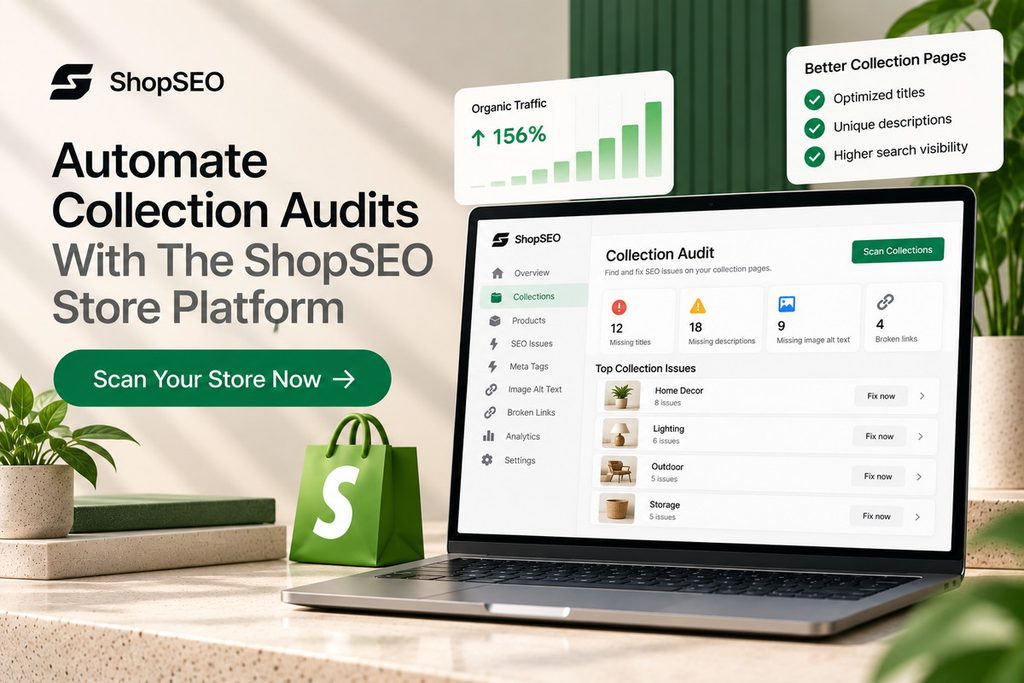
Finding missing meta tags, heavy images, and broken links across hundreds of collections by hand takes weeks of tedious work. ShopSEO audits every collection, product, blog post, and image across your store and gives you a clear written fix. Here is how you can use ShopSEO to find and fix every category optimization gap without risking your live store.
- Run a safe, read-only store audit that grades every single collection page against nineteen essential SEO checks:
- See your lowest-scoring collections first so you know exactly which category pages are holding back your organic rankings.
- Every single audit finding comes with a plain-English explanation telling you what is wrong and how to fix it.
- Nothing is ever written or changed on your Shopify store until you review the recommendation and click apply yourself.
- Fix empty collection metadata, missing alt text, and duplicate structured data in minutes instead of weeks:
- Turn on ShopSEO Autopilot to automatically fill empty meta titles, descriptions, and image alt text from custom templates whenever you save a collection.
- Autopilot never overwrites titles or descriptions you wrote by hand, and every single change can be undone in one click.
- Clean up conflicting schema markup, repair dead internal links, and apply backed-up speed fixes from one simple dashboard.
Start Growing Your Category Traffic And Store Revenue Today
Getting shopify collection pages seo optimization right transforms your store categories from ignored product grids into your best sales channel. When you pair smart sub-collection keywords with split copy, clean canonical links, and compressed images, both shoppers and crawlers win. You do not need to rewrite your entire store overnight or hire an expensive developer to fix every single page.
Start by auditing your top five revenue collections, fixing their titles and internal links, and building out high-intent sub-categories. Consistently keeping your metadata complete and your structured data clean sets your catalog ahead of competing stores in both traditional and AI search.
Visit ShopSEO today to run your free read-only store audit and fix your collection pages in minutes.
FAQs
1. How Many Words Belong On A Shopify Collection Page?
Aim for fifty to eighty words above the product grid and two hundred to three hundred words below it. This split layout gives search engines enough context to rank your category without pushing products below the screen. Every sentence should help the shopper choose the right product rather than repeating generic marketing slogans.
2. Should I Add Product Schema To My Collection Pages?
No, official search engine guidelines state that Product schema belongs only on single product pages, not category listings. Using Product markup on a collection page can trigger structured data warnings or cause search engines to ignore your markup. Use CollectionPage, BreadcrumbList, and FAQPage schema on your category templates instead for clean, compliant visibility.
3. Does Putting One Product In Multiple Collections Hurt SEO?
Assigning the same product to several relevant collections does not cause a duplicate content penalty by itself. However, you must ensure your collection grid links point to the clean /products/ URL rather than collection-aware paths. When all internal links point to one canonical product page, you can safely organize items into multiple helpful sub-collections.
4. How Do I Stop Tag Pages From Causing Duplicate Content?
Shopify generates separate URLs whenever you filter a collection by product tags, which can create hundreds of thin pages. Make sure tagged collection URLs point their canonical tag back to the main unfiltered category page at all times. You can also block low-value sort and filter parameters in your robots.txt.liquid file to save crawl budget.
5. Can I Remove The Collections Word From Shopify URLs?
No, Shopify locks the /collections/ directory prefix into its core routing system for every store on the platform. Trying to hack around this folder structure breaks your store navigation and creates messy redirect chains for crawlers. Focus instead on writing a clean, keyword-focused URL handle right after the /collections/ prefix for great results.
6. How Long Do Collection Page SEO Changes Take To Rank?
Most stores see noticeable ranking movement in Google Search Console within four to eight weeks after updating a collection. Pages that already have some authority and internal links often jump higher within just a few weeks of optimization. Brand-new sub-collections usually take a little longer as crawlers discover the new URL and evaluate shopper engagement.
7. What Is The Best Default Sort Order For Collection Grids?
Set your default collection sorting to Best Selling or a curated Featured order rather than Date Added. Shoppers landing from search engines want to see your most popular, highest-rated items in the very first row. When visitors click products quickly and stay on your site longer, those strong engagement signals support your rankings.
8. How Can I Edit Collection Meta Tags In Bulk Safely?
Writing meta titles and descriptions one by one inside the Shopify admin takes hours when you manage dozens of collections. Using a dedicated audit tool lets you set clean templates that fill empty metadata fields across your catalog automatically. Always choose a tool that protects your hand-written tags and lets you preview or undo changes at any time.

Written by
Mishil PremnathSEO Editor and Digital Content Strategist with a focus on e-commerce optimization, keyword strategy, and high-impact blogging. Mishil creates data-driven, engaging content designed to improve search visibility and user engagement.